
This page explains how we build the solution. It is for developers and other technical readers. Two diagrams give the overview. The first shows the solution from the outside. The second zooms in on the parts. Then we explain how we keep the data of each customer separate, and where we protect the traffic.
This page does not name servers, addresses, versions or other internal details. We do this on purpose, to protect the solution.
Four platforms, one solution
The solution has four editions. They use the same building blocks.
- MinForening is free. It is for associations, clubs and NGOs, including NGO federations and unions. The clubs share hosting.
- MinOrganisation is paid. It is for companies, organisations, federations, unions and larger associations.
- MitSamfund is mainly a local community calendar. It also has tasks, booking and a shop.
- White label gives an organisation its own domain, its own web app and its own mobile app.
On MinForening, an NGO federation or union can buy the module Forbund (Union, beta) in Modulshop (Module shop).
MinOrganisation uses the same code as MinForening. On MinOrganisation, data is more isolated. White label runs on its own Hetzner Cloud server. We manage the server. We can move MinForening clubs and MinOrganisation organisations to white label.
We turn on the modules for each club or organisation. A club or organisation itself controls the modules that it bought in the Modulshop (Module shop). A white label customer often has more control over the modules, and does not always have a module shop. We agree on this based on the needs of the customer. This is why two clubs do not always see the same menu items.
Level 1: The solution and the world around it
The diagram shows the big picture: who uses the solution, and which other systems it exchanges data with. The solution itself is drawn as one box. On the next level, we look inside the box.
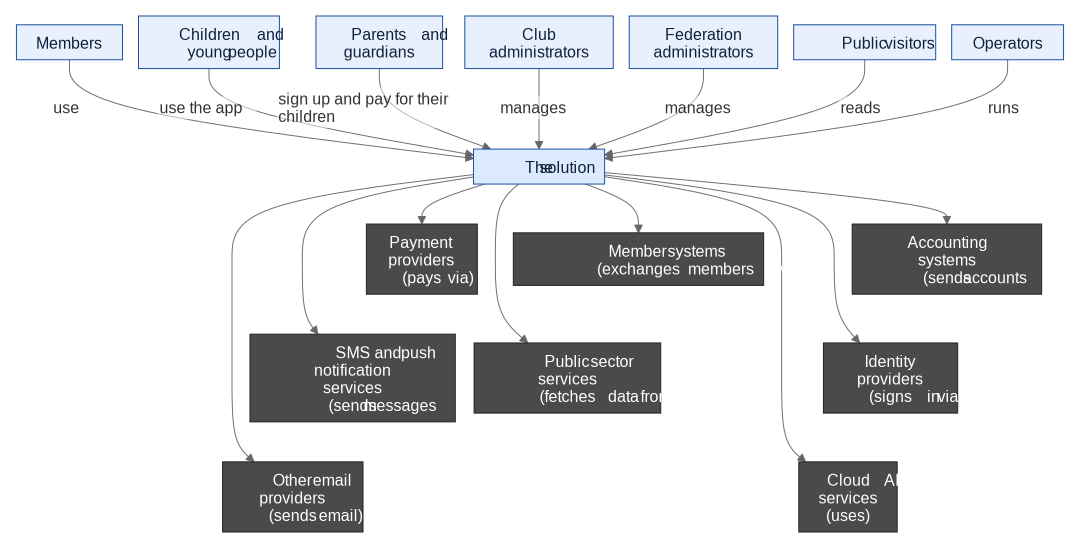
People at the top, the solution in the middle, other systems at the bottom. The arrows show who uses what.
Seven groups of people use the solution:
- Members take part in activities and follow their own membership.
- Children and young people use the app for their own activities.
- Parents and guardians sign up and pay for their children.
- Club administrators run a club: members, activities and payments.
- Federation administrators oversee several clubs in one federation.
- Public visitors read public information and sign up.
- Operators are our own staff, who run the platform.
The solution connects to eight types of external systems:
- payment providers
- accounting systems
- other member systems
- SMS and push notification services
- identity providers
- public sector services
- other email providers: the recipients’ email providers
- cloud AI services: Microsoft Azure OpenAI in an EU region
For most types, the diagram does not show vendor names.
Level 2: A look inside the engine room
The second diagram opens the box. It shows the parts of the solution and how they connect.
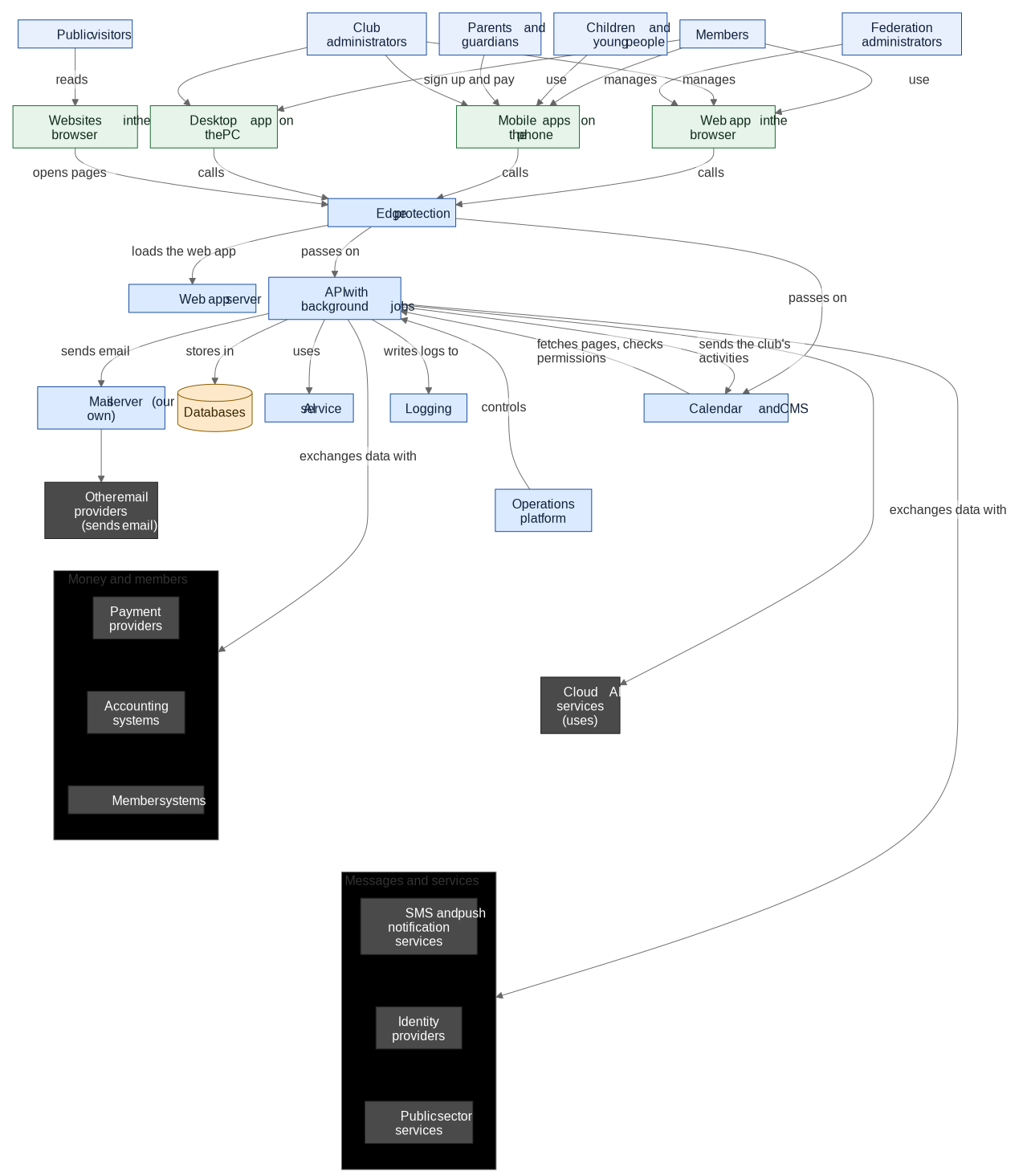
Read the diagram from top to bottom. People at the top, then their apps, then the edge protection, then the parts of the solution, and other systems at the bottom.
People use an app:
- The web app in the browser is for members and administrators. It runs on the user’s own device.
- Mobile apps on the phone are for members, children and young people, parents and administrators.
- The desktop app on the PC has the web app pages and can keep a local copy of club files.
- Websites in the browser: public visitors open club websites and calendar pages.
The browser loads the web app from the web app server. All clubs on MinForening use the same mobile app, and each club has its own area in the app. MinOrganisation has its own app, which all organisations on MinOrganisation use. White label customers get their own app, their own API, their own database and their own server. All apps use the same code. Get the MinForening app from the App Store or Google Play. Get the MinOrganisation app from the App Store or Google Play.
All apps go through the edge protection:
- Edge protection (a web application firewall) sits in front of the parts of the solution.
Edge protection stops traffic that looks like an attack and passes the rest on.
Behind the edge protection are the parts of the solution:
- The web app server delivers the web app files to the browser.
- The API with background jobs holds the business rules, keeps customers separate and does scheduled work. The apps call it.
- Calendar and CMS shows club websites and the calendar to public visitors.
- Databases: each customer (tenant) has its own database. On MinForening, the clubs share one database.
- The AI service receives AI requests from the API. By default, it uses our own Qwen models.
- The mail server: email from the solution is sent from our own mail server directly to the recipients’ mail servers.
- Logging is our internal operations logging system.
- The operations platform is an internal control plane that our staff operate.
Our employees use Microsoft 365 for their email. Email that users write to us goes through Microsoft 365.
The section on tenants below gives more detail about the databases. The calendar and the CMS fetch the club’s pages and content from the API and check administrator permissions with it. The API sends the club’s activities to the calendar. The API also connects to the databases, the AI service and the external systems.
The operations platform creates and closes customer organisations and manages their subscriptions and settings. It also helps us follow the rules. Customers never sign in to it. Logging gathers technical logs from platform services, so that staff can find and solve problems.
Hosting: shared, isolated and dedicated
We offer three levels of hosting. A higher level gives more separation from other customers.
| Level | Platform | What it means |
|---|---|---|
| Shared | MinForening | Clubs share servers and a database. Each club is separate inside the database. |
| Isolated | MinOrganisation | Each organisation has its own database and shares fewer resources with other customers. |
| Dedicated | White label | The organisation has its own Hetzner Cloud server, its own domain, its own web app and its own mobile app. We manage the server. Some services are still shared by all customers: monitoring, our edge protection (WAF) and internal tools for our staff. |
A club or organisation can start on a lower level and move to white label later.
Our servers are at Hetzner in Germany. Hetzner runs the data centres, the hardware, the network and the protection against DDoS attacks. We operate the servers ourselves from the operating system upwards. See the split in decision 0002. We have our own DNS name servers, ns1.wiiandi.dk and ns2.wiiandi.dk, managed by NordName.
Many customers in one solution
We built the solution for many customers at the same time. We use two terms:
- A tenant is the customer that is responsible for the data. Each tenant has its own database.
- A club is inside a tenant. One tenant can hold many clubs, departments or small organisations.
Almost all data in the database belongs to one club. For each request, the API makes sure that a user gets only the data that the user has permission to see. One user can be a member of several clubs.
MinForening is one tenant with many clubs. A customer on MinOrganisation or white label has its own tenant. This is why it has its own database.
Where edge protection is
The web application, the API and the calendar are behind our own edge protection. The edge protection is our own solution, which we developed ourselves. It runs in the Hetzner data centres in Germany, in front of the app servers.
Edge protection blocks known types of attack. It limits the number of requests. It can ask suspicious clients to prove that they are not bots. It can also block traffic by country. It also gives encrypted connections with automatic certificates.
We do not publish rules, limits or the traffic path. That information would help an attacker.
AI in the solution
Some features use AI. We use two types of AI provider in the solution:
- our own Qwen language models on our own infrastructure
- Microsoft Foundry OpenAI in an EU region
By default, AI features use Qwen models that we host ourselves. Microsoft Azure OpenAI in an EU region is used for some features and as a fallback. Our developers use Claude from Anthropic only internally, for example for bug reports. Among other tools, our support team uses Qwen AI models that we host ourselves, so that we can help you faster.
The provider depends on the feature. The AI page names the provider for each feature.
Read more
- MinForening: free platform for clubs
- MinOrganisation: platform for organisations and federations
- MitSamfund: local community calendar
- White label: own app, own domain and own server
- How we protect your data
- Platform systems: among others the edge protection
- AI in the solution: features and providers
- Decision records: why the solution is built the way it is
- Guide: club settings and modules
Last updated: